LCS to PPAC migration: the time has come!
We’ve been talking about the move from Lifecycle Services (LCS) to Power Platform admin center (PPAC) for some time. It was one of the things I wanted to cover in the new Dynamics 365 ALM Guide.
Well, we’re finally there!
Since February 2026, new Dynamics 365 F&O customers have been starting directly in PPAC. Since September 2026, existing customers have been able to use the self-service migration feature, currently in public preview.
But what does migrating an environment actually mean? Are we moving databases? What happens to our deployments? And, most importantly, should we start migrating everything right now?
Let’s have a look at the sandbox migration and what it means for admins, developers and release pipelines.
Warning
Self-service migration is in public preview. Microsoft recommends starting with sandboxes and not migrating production during preview. Check the latest guidance before migrating, as the documentation is subject to change.
What’s happening to LCS?Link to section: What’s happening to LCS?
First, LCS isn’t disappearing overnight. But it’s time to shut down the laptop it’s running on! 😅
Existing projects continue working. Some scenarios still require LCS:
- Dynamics 365 Commerce projects.
- Dynamics AX 2012 upgrade projects.
- On-premises deployments.
- Tenant-to-tenant migrations.
A quick look at the unified environment modelLink to section: A quick look at the unified environment model
Until now, we’ve managed F&O in LCS and CRM/Power Platform in PPAC, even when the environments were linked.
With unified administration, F&O is managed as an application in a Dataverse environment. It can share that environment with Dynamics 365 customer engagement apps, Power Apps and Power Automate flows.
But F&O still has its own database.
If you’ve already deployed a Unified Developer Environment (UDE), this should look familiar.
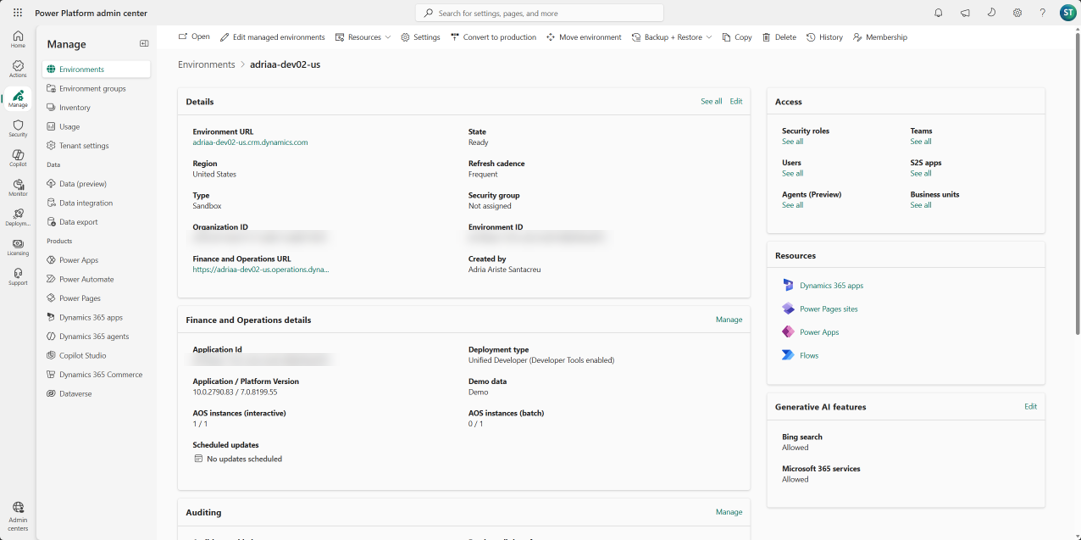
Now we have two URLs, one for Dataverse and another for F&O.
From slots to capacityLink to section: From slots to capacity
Provisioning changes too: we’re going from slots to a capacity-based model. In LCS, the base 20 licenses usually gave us slots for production and one sandbox. If we needed another sandbox, we had to purchase another slot.
In PPAC, we can provision more sandbox or production environments as long as we have enough capacity. Microsoft says there’s no strict limit on how many environments we can create, but we need at least 1 GB available of Dataverse database capacity to provision another one. And remember they all consume storage!
Yes, we can have multiple production environments!
How is capacity calculated? You know I don’t like getting into licensing, but this matters: your tenant capacity is based on your licenses.
Check the licensing tab in PPAC for your capacity. Jukka Niiranen’s Capacity Calculator is useful too.
The migrationLink to section: The migration
Remember the question from the beginning? No, we’re not moving databases. The database stays where it is, and the environment’s infrastructure doesn’t really change. What changes is where we manage the environment from: PPAC instead of LCS.
But the migration still needs downtime, so plan a maintenance window outside business hours.
A few things you need to know before clicking the migration button:
- It’s a one-way trip. Once migrated, the environment is read-only in LCS, we manage it from PPAC, and we can’t move it back.
- The LCS slot is not freed up. We can’t use it to deploy another sandbox in LCS.
- Each environment is migrated on its own, so we can validate one before continuing with the next.
Before migrating: prerequisitesLink to section: Before migrating: prerequisites
LCS runs four prerequisite checks:
- The environment must be deployed and healthy. Its status in LCS must be Deployed.
- The environment must be linked to Power Platform.
- There must be sufficient database storage capacity. If your tenant has a capacity deficit, you’ll need to resolve it first.
- You must be an administrator of the linked Power Platform environment.
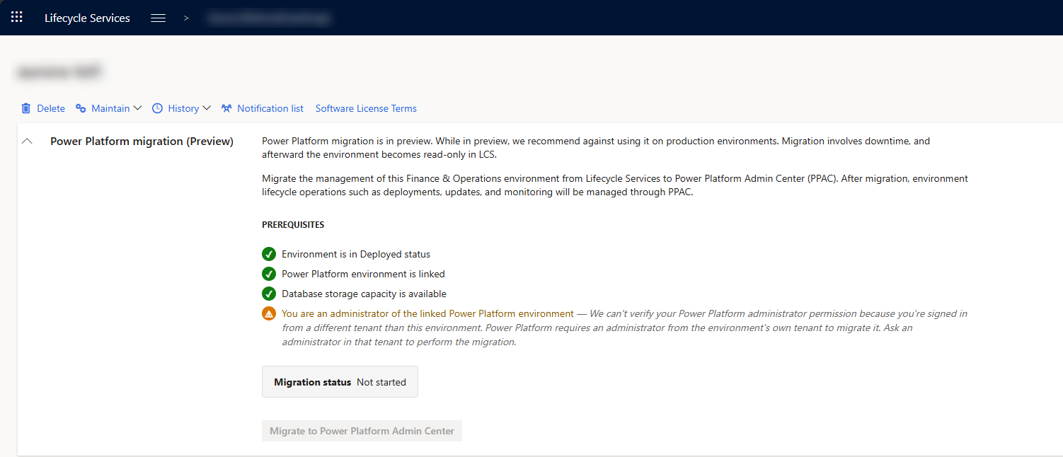
Here, the first three checks pass, but the admin check fails because the signed-in user belongs to a different tenant.
Being an admin in LCS doesn’t make us an admin in Power Platform! If you’re working as a partner, confirm your permissions in the customer tenant before the maintenance window.
Migrating an environment from LCS to PPACLink to section: Migrating an environment from LCS to PPAC
Step 1: Open the environment in LCSLink to section: Step 1: Open the environment in LCS
Sign in to LCS, open your project and select the environment. In Full details, expand Power Platform migration (Preview) to see the checks and migration status.
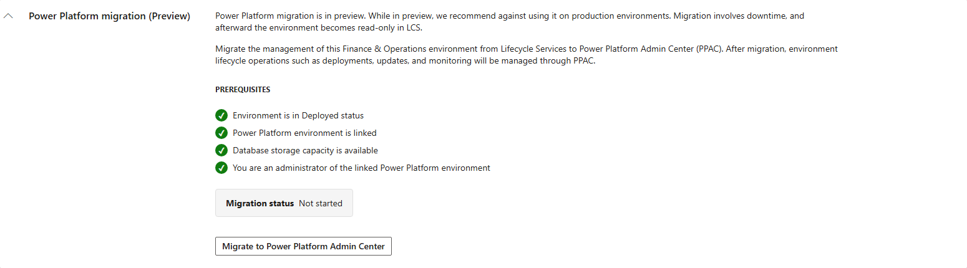
All four checks must be green. And remember to verify that the environment doesn’t use Commerce, because LCS won’t check that for you.
Step 2: Start the migrationLink to section: Step 2: Start the migration
Click Migrate to Power Platform Admin Center to open the confirmation dialog.
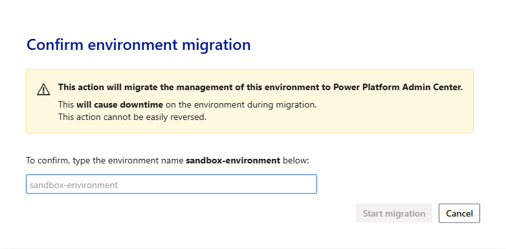
Enter the environment name and confirm the operation.
Allow approximately 10 to 15 minutes per AOS instance. That’s about 60 minutes for 4 AOSes. Leave some extra time, just in case.
Once the process finishes, the migration status changes to Migrated.
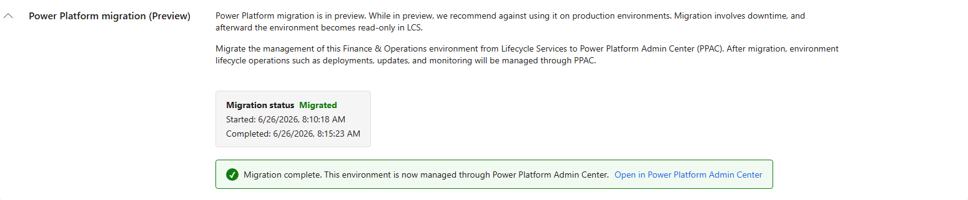
Follow the Open in Power Platform Admin Center link.
And that’s it! But I wouldn’t call the job done just yet.
Step 3: Validate the migrated environmentLink to section: Step 3: Validate the migrated environment
Before migrating another environment, I’d check:
- Users can sign in to Finance and Operations.
- The environment details are displayed correctly in PPAC.
- Monitoring and lifecycle operations are accessible.
- Backups, restores and updates work as expected.
- A previously validated customization can be deployed using the new pipelines (more on this in a sec!).
- Critical integrations, add-ins and business processes work.
- An environment copy can be completed and the target validated.
If something doesn’t work, stop and report it to support!
ALM: here’s the fun part!Link to section: ALM: here’s the fun part!
This is what I’ve been waiting for. 😁
For years, we’ve built deployable packages, uploaded them to the LCS Asset library and deployed from there. Production releases meant marking the package as a release candidate after sandbox deployment, then manually scheduling the production update in LCS.
With unified environments, we can deploy directly to production from an Azure DevOps release pipeline!
Yes, production. From the pipeline. Finally!
That’s the deployment model we’re preparing for once production is managed from PPAC. During the migration preview, we’ll validate that process in our sandboxes first.
Here’s what we’ll use:
- X++ NuGet packages: stored in Azure Artifacts and used by the build pipelines, as usual.
- Dynamics 365 Finance and Operations Tools: the Create Deployable Package v3 task to generate the unified package.
- Power Platform Build Tools: to work with unified packages and deploy them.
- Power Platform CLI: if we prefer using the CLI, we have
pac package deployto deploy the package, and the newpac tool xppcommands to install the X++ compiler and the PackagesLocalDirectory we need to build.
We can’t just point our existing release pipeline at a PPAC environment and expect it to work. We need to change the packaging and deployment steps.
And there’s more good news! For PPAC deployments, the Power Platform Build Tools let us authenticate with a service principal. More on this on the ALM Guide, in the Create a classic release pipeline article.
No more explaining to IT why our LCS service connection needs a user account without MFA!
What happens to our release pipelines?Link to section: What happens to our release pipelines?
Please, please, please, being able to deploy directly to production doesn’t mean skipping UAT.
Build → Test → PreProd → Production is still the way.
Build once, validate the package in test and preproduction, then deploy that same package to production.
For example, deploy automatically to test after a successful build, then require approvals for preproduction and production, with production scheduled for the agreed maintenance window.
More on this in the ALM guide: Create a YAML Build and Release Pipeline With Stages.
Have the new release pipelines ready before migrating. Finding out the old deployment task no longer works when we need to release a fix would be a bad way to start…
During the transition: LCS production and PPAC sandboxesLink to section: During the transition: LCS production and PPAC sandboxes
During preview, we might have a sandbox in PPAC while production is still in LCS. And here’s the catch: the migrated sandbox is out of the LCS deployment flow.
Why does this matter? To deploy to a production environment in LCS, the package must be deployed to a sandbox in LCS first, and then marked as a release candidate. Deploying it to the migrated sandbox from the new pipeline doesn’t count!
So while production is still in LCS, we need to keep at least one sandbox in LCS to be able to release to production.
The good news is that the build can generate both the LCS package and the Power Platform unified package from the same code. We deploy each one through its own process: the LCS one to the LCS sandbox and production, and the unified one to the migrated sandboxes.
Before migrating that last LCS sandbox, decide how you’ll keep releasing to production.
What happens to development environments?Link to section: What happens to development environments?
Cloud-hosted development environments (CHEs) aren’t migrated to PPAC. We’ll need Unified Developer Environments (UDEs), or a VHD-based VM.
I’d get that setup working alongside the new pipelines, before migrating.
Other changes worth knowingLink to section: Other changes worth knowing
Some of these deserve an article of their own, but here’s what else I’d check:
- Environment management: maintenance mode becomes admin mode, and backups, restores and the other lifecycle operations are done from PPAC.
- Environment copy: it replaces the database refresh, but be careful, because it copies code and data, while the LCS refresh only copied data. If we copy production to a sandbox, the sandbox gets production’s code too, and any newer customization we had there is gone. Plan the copies around testing and deployments!
- Database access: we can request just-in-time SQL credentials for UDEs and unified sandboxes from Visual Studio, in Tools > SQL Credentials for Dynamics 365 FinOps. This doesn’t give us SQL access to production. And backups stay in the cloud, we can’t download them as
.bakor.bacpacfiles. - Environment types: we have Unified Developer Environments (UDE), Unified Sandbox Environments (USE) and Unified Production Environments (UPE). Choose well when deploying, because a UDE can’t be changed to a USE, or the other way around.
- Monitoring: Application Insights gives us near-real-time telemetry for X++ exceptions, batch jobs, forms and other operations, and we can use Azure Monitor for alerting. I’d configure this before the first migration.
- Service updates and backups: review the maintenance settings, update cadence and backup retention in PPAC. And take a manual backup before any significant change.
Some LCS features, such as project methodology, organization users and business process modeling, move to other tools.
See the unified administration experience documentation for the full list of features and differences.
How I’d approach the migrationLink to section: How I’d approach the migration
Clicking the button is the quick part! I’d spend most of the preparation time on the development setup and pipelines, then use a less critical sandbox as the pilot:
- Prepare the unified development experience. Deploy UDEs and make sure developers can work with the new tools.
- Build and validate the pipelines. Test the unified packaging and deployment process.
- Configure administration and monitoring. Review roles, access, capacity and Application Insights.
- Migrate one sandbox. Use it as a pilot and document anything that behaves differently.
- Validate everything. Test sign-in, deployments, integrations, backups, updates and environment copies.
- Migrate the remaining sandboxes. Validate each one, and remember to keep one sandbox in LCS while production is still there.
- Leave production for last. Wait until production migration is recommended and your processes are ready.
I know we’ve been waiting for this for years, but I wouldn’t rush it. LCS has been with us for a long time, it can wait a bit more while we get the pipelines ready. 😅
ReferencesLink to section: References
- Migrate Lifecycle Services environments to Power Platform admin center
- LCS project creation freeze
- Finance and operations apps in Power Platform admin center
- Unified environment types and templates
- CI/CD for finance and operations apps
- Database access for unified environments
- Monitoring and telemetry