New Azure DevOps release tasks: MSAL authentication and ADAL deprecation
There’s a new version and a new task for our release pipelines that use the Azure-hosted agents. These changes have been introduced recently to support the new MSAL authentication libraries for the LCS service connection used to upload and deploy the deployable packages. The current service connections use Azure Active Directory (Azure AD) Authentication Library (ADAL), and support for ADAL will end in June 2022. This means that if we don’t update the Asset Upload and Asset Deployment to their new versions (1.* and 2.* respectively) the release pipelines could stop working after 30th June 2022. I’d like to thank Joris de Gruyter for the tip, otherwise I couldn’t have written this post 😛
New MSAL taskLink to section: New MSAL task
If you don’t add this task to your pipeline, you’ll get the error: [error]The specified module ‘MSAL.PS’ was not loaded because no valid module file was found in any module directory. There’s also a new task to add the support for MSAL authentication. This task will install the MSAL PowerShell libraries in your Microsoft-hosted agent, and you need to add it before any other task authenticates. Like this:
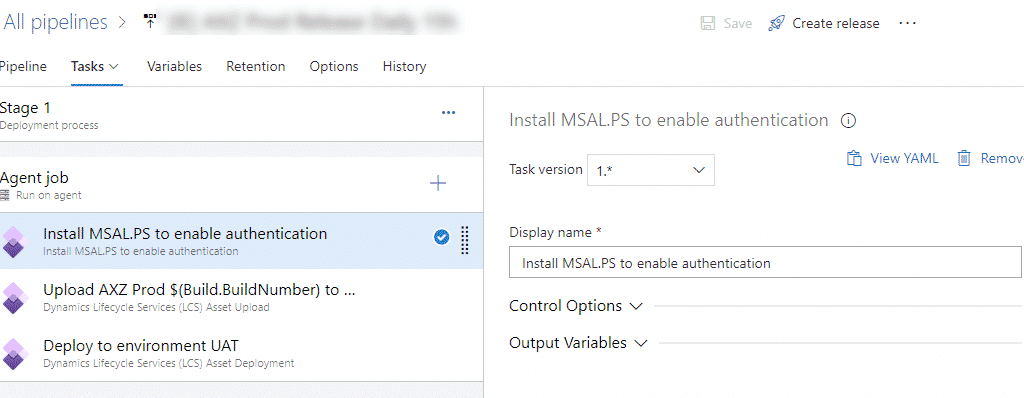
The task has no parameters or options that need to be filled, just add it to your release pipeline, and you’re done. If you’ve got a multi-stage release pipeline, you have to add this new task to each stage where there’s an authentication step. For example, if you have a first stage that uploads the DP to LCS, and then another one that deploys it and doesn’t have the task, it will fail. This is at least true in projects with additional agents, I need to try it with a single agent project.
New Asset Upload and Deploy versionsLink to section: New Asset Upload and Deploy versions
To support the new MSAL authentication, the dev tools team at Microsoft have published new versions of both tasks.
Asset UploadLink to section: Asset Upload
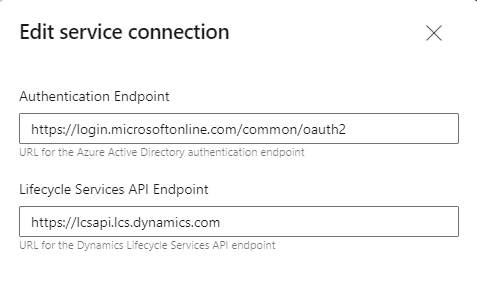
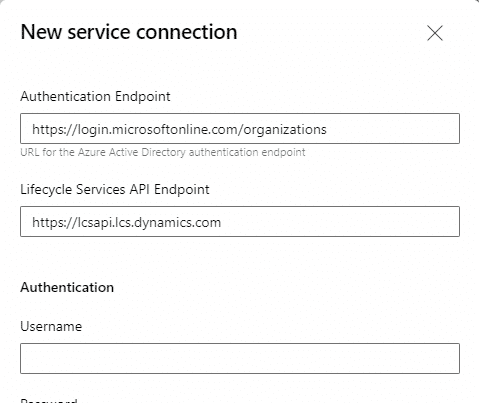
If you change the version of the Asset Upload task from 0.* to 1.* you’ll see no changes. The fields in the task are the same, but it will use MSAL as the new authentication method. But wait, just changing the version won’t be enough, you need to create a new service connection to LCS because the authentication endpoint has changed to https://login.microsoftonline.com/organizations. This endpoint will be the one used, from now on, in all versions, the old ones and the new. Here you can see the old service connection endpoint:
And the new one:
Caution! If you’re using any of the LCS geos, like Europe, Norway, South Africa, etc. the endpoints need to reflect that as described in the table:
| Geography | Lifecycle Services portal | Lifecycle Services API endpoint | Environment URL |
|---|---|---|---|
| United States | https://lcs.dynamics.com/ | https://lcsapi.lcs.dynamics.com | https://NAME.operations.dynamics.com/ |
| Europe | https://eu.lcs.dynamics.com/ | https://lcsapi.eu.lcs.dynamics.com | https://NAME.operations.eu.dynamics.com/ |
| France | https://fr.lcs.dynamics.com/ | https://lcsapi.fr.lcs.dynamics.com | https://NAME.operations.fr.dynamics.com/ |
| Norway | https://no.lcs.dynamics.com/ | https://lcsapi.no.lcs.dynamics.com | https://NAME.operations.no.dynamics.com/ |
| South Africa | https://sa.lcs.dynamics.com/ | https://lcsapi.sa.lcs.dynamics.com | https://NAME.operations.sa.dynamics.com/ |
| Switzerland | https://ch.lcs.dynamics.com/ | https://lcsapi.ch.lcs.dynamics.com | https://NAME.operations.ch.dynamics.com/ |
| United Arab Emirates | https://uae.lcs.dynamics.com/ | https://lcsapi.uae.lcs.dynamics.com | https://NAME.operations.uae.dynamics.com/ |
Asset DeploymentLink to section: Asset Deployment
In the Asset Deployment task we now see three versions: 0.* which was the original one, 1.* which is the one that enabled support for self-service environments, and 2.* which is the new task that supports MSAL authentication. If you’ve already created the service connection in the previous step, just change it to use the new one.
And what about self-hosted agents (build VM)?Link to section: And what about self-hosted agents (build VM)?
I’m not sure. But probably just installing the MSAL.PS PowerShell library in your build VM will be enough, if it’s not there already.
Latest MSAL.PS task version 1.0.1572609 (January 2024)Link to section: Latest MSAL.PS task version 1.0.1572609 (January 2024)
If you’re getting an error in the Asset Upload task: “The underlying connection was closed: An unexpected error occurred on a receive.”, make sure to update your pipeline agent specification to windows-2022: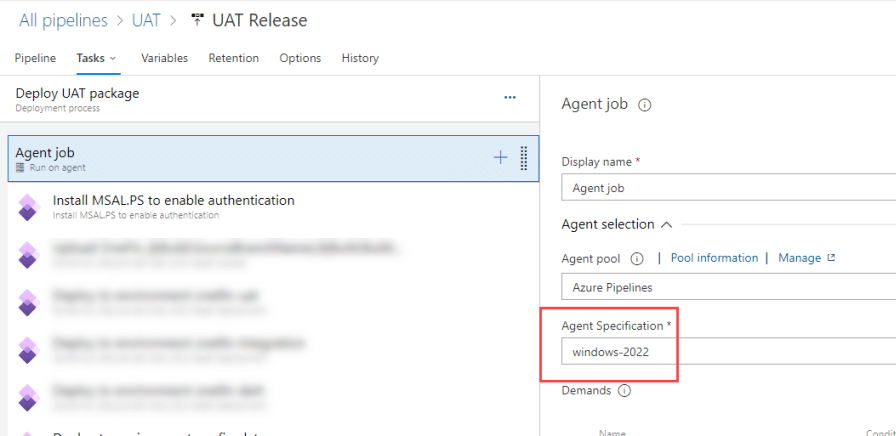 This will fix the issue!
6 comments
Hi
We are getting “Error creating new file asset: ‘You don’t have the required permissions to perform this operation.'”
We are using a EU LCS project could that be the problem?
We have also with MSAL.
Søren PC
Has the user which is used in the service connection logged into LCS? Sometimes that’s an issue. Another one could be not having the right role in LCS.
And I also know that for the past days there are issues with LCS, with failing pipelines.
Yes logged in and is Project owner.
A Microsoft case is opened awaiting responds.
PS: Can the EU geo be related?
I wouldn’t be surprised it’s an LCS issue regardless of the region.
Hi Adria
IM also getting the same error trying to upload package to LCS. Customer also using Europe LCS.
[error]Error creating new file asset: ‘You don’t have the required permissions to perform this operation.’
Regards
Peter
Hi Peter,
If you’re using any of the LCS’ geos you need to use the right LCS API Endpoint in the service connection, and also the LCS url. I will update the document and post, because I thought I already had, oops.
Comments are closed.